




The only SSH connection management tool you'll ever need. CLI & TUI. No dependencies, no manual file editing.
Four core features: Create, Connect, Edit, Delete. Dead-simple and cross-platform.
Store connections in SQLite, your ssh_config file, or both — your choice.
Passwords are encrypted using a master passphrase (you should consider using pubkeys only tho ;)).
📚 Full docs: dssh.grolmes.com
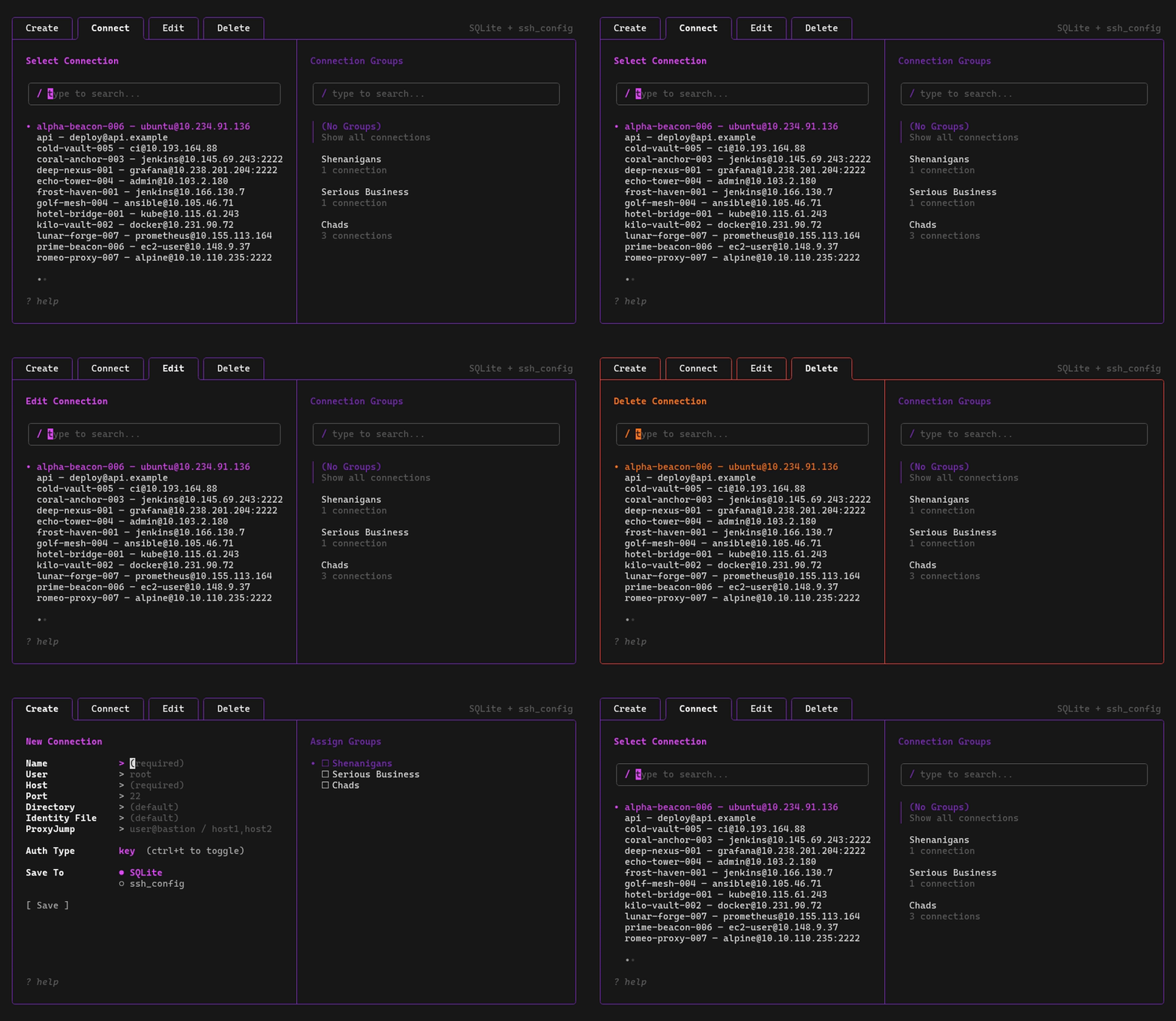
TUI navigation

TUI connect
- Features
- How it works
- Connection Modes
- Usage
- Installation
- Documentation
- Contributing
- Acknowledgements
Core:
- Fancy TUI ✨ — run
dsshwith no args to connect and manage all your connections - Instant connect 🚀 —
dssh myserverand you're in - Create Wizard 🪄 — easily add new connections without memorizing flags
- Edit ✏️ — no need to delete and re-add connections, just edit them
- Connection groups 🗂️ — organize connections into multiple groups and filter every management tab instantly
Also:
- Multiple storage backends 🗄️ — use SQLite (
~/.dssh/dssh.db), yourssh_configfile, or both - Launch into a directory 📂 — optionally land in a specific remote directory on connect
- Password encryption 🔒 — AES-256-GCM + Argon2id, protected by a master passphrase
- Cross-platform 💻 — Linux, macOS, Windows, FreeBSD (amd64 + arm64)
- Dead simple migration 📦 — moving to a new machine? Just take
~/.dssh/dssh.dbwith you. That's it.
dssh is a thin wrapper around your system's ssh binary:
  ┌──────────────┐   read/write    ┌──────────────────────┐
  │  dssh (CLI   │◄───────────────►│  ~/.dssh/dssh.db     │
  │   or TUI)    │                 │   • connections      │
  └──────┬───────┘                 │   • encrypted passes │
         │                         └──────────────────────┘
         │  key auth: syscall.Exec → ssh  (zero overhead)
         │  pw auth:  fork ssh + SSH_ASKPASS script
         ▼
  ┌──────────────┐
  │     ssh      │────► remote host
  └──────────────┘
- Key auth —
syscall.Execreplaces the dssh process with ssh (zero overhead, full terminal control) - Password auth — ssh runs as a child process with
SSH_ASKPASSto supply the decrypted password (nosshpassneeded) - Data — connections stored in SQLite (
~/.dssh/dssh.db), yourssh_configfile, or both; groups and assignments are stored as SQLite metadata - Crypto — AES-256-GCM encryption with Argon2id key derivation for stored passwords
More on the security model and configuration in the docs.
On first launch, dssh asks you to choose a connection mode:

| Mode | Description |
|---|---|
| SQLite only | Connections stored in ~/.dssh/dssh.db (default) |
| ssh_config only | Connections read from and written to your ssh_config file |
| Both | Use SQLite and ssh_config side by side, toggle with CTRL+L |
When using ssh_config or both, you pick a destination file:
- Main file —
~/.ssh/config - Directive —
~/.ssh/config.d/dssh - Custom path — any file you choose
If the file doesn't exist, dssh offers to create it for you.
Change your mode anytime with dssh config. View current settings with dssh config get (or dssh config show).
Note: Password auth is only available when saving to SQLite. ssh_config entries always use key auth.
| Command | Description |
|---|---|
dssh |
Launch interactive connection picker |
dssh <name> |
Connect to a saved host by name |
dssh <name> -- <args> |
Connect with extra args forwarded to ssh |
dssh connect <name> -- <args> |
Explicitly connect by name (including a connection named group) |
dssh add [-p PORT] [-d DIR] [-J JUMP] [--group GROUP] <name> <target> [password] |
Save a new connection |
dssh rm <name> |
Delete a saved connection |
dssh list / dssh ls |
List connections; supports --group, --ungrouped, and --json |
dssh group list [--json] |
List groups and source-scoped membership counts |
dssh group create NAME |
Create a group |
dssh group rename NAME NEW_NAME |
Rename a group |
dssh group delete NAME |
Delete a group and its memberships (not connections) |
dssh group assign GROUP CONNECTION... |
Assign connections to a group in one selected source |
dssh group unassign GROUP CONNECTION... |
Remove connections from a group in one selected source |
dssh create / dssh new |
Interactive form to create a connection |
dssh edit |
Edit an existing connection |
dssh delete |
Delete a connection (TUI, triple-confirm) |
dssh config |
Configure connection mode (SQLite / ssh_config / both) |
dssh config get / dssh config show |
Show current configuration |
dssh reset |
Delete all data (double confirmation) |
dssh --version |
Print version |
| Key | Action |
|---|---|
Tab / Shift+Tab |
Switch between the left connection pane and right group pane |
← / → |
Switch between tabs (Connect / Edit list / Delete always; Create / Edit forms when on an empty field, the Save button, or the Save-To toggle) |
↑ / ↓ |
Navigate lists / move between form fields |
Enter |
Select / confirm |
Space |
Toggle a group assignment in Create / Edit |
Ctrl+N |
Create a group from the right pane |
Ctrl+R |
Rename the selected group |
Ctrl+D |
Delete the selected group (connections are kept) |
Ctrl+L |
Toggle SQLite / ssh_config list (both mode) |
Ctrl+T |
Toggle key / password auth (create/edit) |
Ctrl+S |
Save a new or edited connection from either pane |
ESC / Ctrl+C |
Quit |
The right pane filters the connection list as soon as you select a group. Selecting (No Groups) shows all connections.
A terminal size of at least 80×20 is required.
# Add a connection (will use default pubkey identity)
dssh add myserver root@192.168.1.10

# Add it to an existing group
dssh add --group Production myserver root@192.168.1.10

# Connect
dssh myserver

# You're in!

# Permanently delete the connection (no confirmation asked)
dssh rm myserver
# Open the TUI where you can basically do anything
dsshRun dssh with no arguments to launch the TUI.
# user@host (port 22 by default)
dssh add myserver root@192.168.1.10

# Custom port
dssh add myserver -p 2222 root@192.168.1.10

# SSH URI syntax
dssh add myserver ssh://root@192.168.1.10:2222

# Start in a specific remote directory
dssh add myserver -d /var/www root@192.168.1.10

# Through a jump host (ProxyJump / ssh -J)
dssh add db01 -J jumpuser@bastion.example.com dbadmin@10.0.1.50

# Through a chain of jump hosts
dssh add db01 -J jump1.example.com,jump2.example.com dbadmin@10.0.1.50

# With password (will prompt for master passphrase)
dssh add myserver root@192.168.1.10 'my-ssh-password'# Direct connect by name
dssh myserver
# Pass extra args to ssh
dssh myserver -- -v -L 8080:localhost:80
# Explicit form; use this if a connection is named "group"
dssh connect myserver -- -vLaunch the TUI wizard to create a connection interactively.
dssh create
dssh new # alias
The wizard supports both key-based and password-based authentication. For password auth, you'll be prompted to create a master passphrase on first use.
Launch the TUI directly on the Edit tab to modify an existing connection.
dssh editLaunch the TUI directly on the Delete tab. Requires pressing Enter 3 times on the same item to confirm.
dssh deletedssh list
dssh ls # alias
# Filter by one or more groups, or return safe machine-readable fields
dssh list --group Production --group Staging
dssh list --ungrouped --jsonNAME USER HOST PORT AUTH DIR JUMP
mike-pulse-001 nomad 10.51.140.154 22 key - -
myserver root 192.168.1.10 22 password - -
rpg-server npc 192.168.188.7 22222 key /var/larp -
sharp-nexus-001 deploy 10.105.210.233 22 key - jumpuser@bastion
skylink root skylink.vps 22 key - -
dssh rm myserverRemove a connection instantly. No confirmation asked.
Groups are optional organization. A connection may be in one, multiple or no groups. Deleting a group removes its memberships, never connections.
You need to create groups before you can use them. Names are case-insensitive.
Groups are source-aware: Groups metadata is always stored in SQLite DB, including for ssh_config connections. The same connection name in each source can have different groups.
- Connect & Delete Tabs: use the right pane to filter groups
- Create Tab / Edit Connection: press
Spaceto toggle assignments andCtrl+Sto save.Ctrl+N,Ctrl+R, andCtrl+Dmanage groups. - Filtering: The TUI’s
(No Groups)means “show all”; CLI--ungroupedmeans only connections with no groups.
# Create "Production" group
dssh group create Production
# Rename "Production" group to "Live" (group names are case-insensitive)
dssh group rename production Live
# List groups with counts for the active source(s)
dssh group list
# List all groups in JSON format
dssh group list --json

# Add new connection "api" with user "deploy" and host "api.example" to existing group "Live"
dssh add --group Live api deploy@api.example

# Delete group "Live" (connection is not deleted)
dssh group delete LiveBatch assign/unassign is atomic - meaning all groups and all connections must exist or else the batch fails.
# Assign connections "api" & "worker" to group "Production"
dssh group assign Production api worker
# Unassign connections "api" & "worker" from group "Production"
dssh group unassign Production worker
In both parse mode either --sqlite or --sshconfig is required.
# List connections from groups "Production" and "Staging"
dssh list --group Production --group Staging
# List all ungrouped connections
dssh list --ungrouped
# List connections from group "Production" in JSON format
dssh list --group Production --json
Repeat --group on list for OR filtering.
dssh connect groupSwitch between SQLite, ssh_config, or both at any time.
dssh config
View current settings:
dssh config getparse_mode: both
ssh_config_parse_destination: ~/.ssh/config.d/dssh
parse_both_view_mode: sqlite
parse_both_default_save_target: sqlite
Wipe all saved connections, encrypted passwords, groups, assignments, and settings (deletes the SQLite database). Requires two confirmations to prevent accidents.
dssh resetThis will delete ALL saved connections, passwords, and settings. Continue? (yes/no): yes
Are you sure? This cannot be undone. Type 'reset' to confirm: reset
All data has been reset
yay -S dsshparu -S dsshOther package managers following soon!
brew install madLinux7/tap/dsshwinget install madLinux.dssh# add scoop bucket (if not done already)
scoop bucket add madLinux7_scoop-bucket https://github.com/madLinux7/scoop-bucket
# install dssh
scoop install madLinux7_scoop-bucket/dsshLinux / macOS / FreeBSD:
curl -fsSL https://raw.githubusercontent.com/madLinux7/dssh/main/install.sh | shInstalls to ~/.local/bin by default. Override with INSTALL_DIR=/custom/path.
Windows (PowerShell):
irm https://raw.githubusercontent.com/madLinux7/dssh/main/install.ps1 | iexInstalls to %LOCALAPPDATA%\dssh and adds it to your PATH automatically.
Download the latest binary for your platform from Releases and place it in your $PATH.
# Example for Linux amd64
curl -L https://github.com/madLinux7/dssh/releases/latest/download/dssh-linux-amd64 -o dssh
chmod +x dssh
sudo mv dssh /usr/local/bin/Requires Go 1.26+.
go install github.com/madLinux7/dssh/cmd/dssh@latestgit clone https://github.com/madLinux7/dssh.git
cd dssh
# Build only with optimized -ldflags
make build
# Build and compress binary (upx needed)
make releaseFull docs live at dssh.grolmes.com:
- Get started — install, pick a storage mode, save your first connection
- Command reference — every CLI flag and example
- TUI keybindings — key map per screen
- Configuration — parse modes, file locations, session flags
- Security model — crypto flow, threat model, key vs password
- Migration — from
ssh_config, across machines, between modes - Troubleshooting — permission denied, lost passphrase, WSL quirks
- FAQ — YubiKey, passphrase rotation, portability
- Limitations — what dssh deliberately doesn't do
PRs welcome. See the Contributing guide for the dev loop, package layout, and PR checklist.
Bugs and feature requests: github.com/madLinux7/dssh/issues. Security disclosures: please use GitHub's Security advisory flow — don't file in the public tracker.
dssh has no need for reinventing the wheel — thanks to the maintainers and contributors of these amazing projects:
- Bubble Tea by Charm — pretty sick TUI framework
- Bubbles by Charm — ready-to-go TUI components (lists, text inputs) so I don't need to reinvent the wheel
- Lip Gloss by Charm — style definitions that make the terminal look ✨ pretty ✨
- Cobra by Steve Francia — the CLI framework powering every
dsshcommand - modernc.org/sqlite by Jan Mercl — pure-Go SQLite driver that lets you ship a single static binary with zero CGO
- golang.org/x/crypto by the Go team — Argon2id key derivation keeping your passwords safe
- golang.org/x/term by the Go team — secure terminal password reading without echo
- UPX by Markus Oberhumer, Laszlo Molnar & John Reiser - Reducing the Linux release binary size by an insane 64%! (9.0MB -> 3.3MB)